

Use username and password authentication when clients move between networks or each user needs a separate revocable credential. Use IP allowlisting when a server or gateway has a stable public egress address and distributing secrets would add unnecessary risk. An HTTP 407 response means the proxy was reached but did not accept usable proxy authorization. Diagnose the method, source route, and client behavior before rotating endpoints or changing destination settings.
Scope: this guide covers authorization to use forward proxies, with HTTP challenges, SOCKS5 username/password negotiation, and provider-side source-IP approval. It does not cover website account login, destination API keys, VPN identity, or enterprise single sign-on. Use the Proxy Testing and Troubleshooting hub for the surrounding diagnostic sequence.
Go applications need the same boundary separation: the Go net/http proxy guide shows how ProxyFromEnvironment and ProxyURL carry proxy credentials, how 407 differs from destination 401, and why credential-bearing URLs must not be logged.
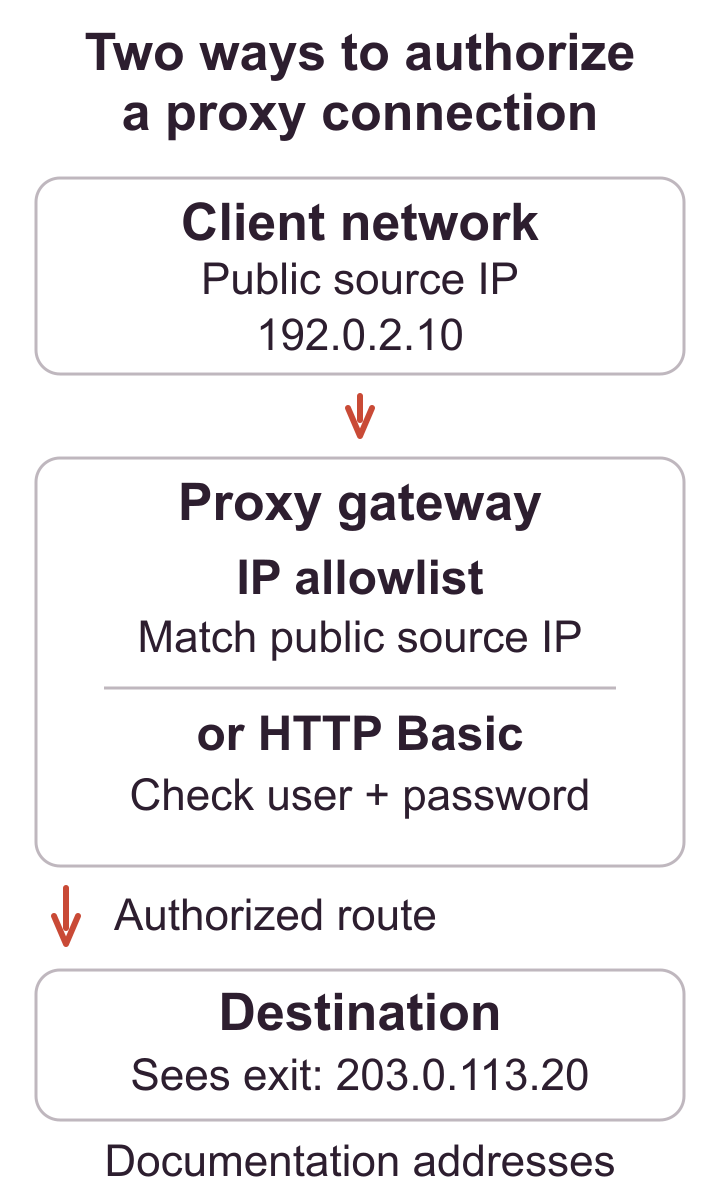
Authentication is a control point, not a routing feature
A client can reach the correct proxy and still be denied because the connection is not authorized. Conversely, valid credentials do not prove the client used the intended protocol, destination, or exit. Keep reachability, authentication, routing, and destination response as separate observations. This prevents a website 401 or 403 from being misreported as a proxy credential problem.
The access model should answer three questions: who may use the endpoint, from which networks, and how quickly access can be revoked. A solo browser on changing Wi-Fi has different needs from a fixed build server behind one NAT gateway. Choose the model that matches the real source route rather than the interface that looks simpler during setup.
How username and password authentication works
With HTTP proxies, the server can challenge a request and the client can send a Proxy-Authorization field using an accepted scheme. With SOCKS5, the client and server negotiate a method before the destination connection is requested. RFC 1929 defines a username/password sub-negotiation for SOCKS5; it also warns that the password is carried in clear form within that sub-negotiation, so protection of the surrounding client-to-proxy path matters.
Credentials are convenient for laptops, CI workers with protected secrets, and clients whose public source address changes. They can be unique per person or application, rotated without updating a firewall allowlist, and revoked independently. The cost is secret lifecycle management: generation, delivery, storage, redaction, rotation, offboarding, and audit.
A credential must never be committed to source control or placed in a public command example. Avoid embedding it directly in a proxy URL when the command line, process list, crash report, or browser history can retain it. Prefer a password prompt, protected configuration file, or secret manager supported by the application. Scope access to the smallest set of endpoints and rotate any value exposed in logs or screenshots.
How IP allowlisting authorizes a source route
IP allowlisting tells the proxy service to accept connections whose observed public source address matches an approved entry. It can be operationally clean for a server behind a static address or a managed office gateway. No proxy password needs to be delivered to each process, and the rule can be managed centrally.
The important word is observed. A machine’s private address such as 10.0.0.25 is not normally what a public proxy sees. The connection may leave through a NAT gateway, corporate firewall, cloud egress service, carrier network, VPN, or failover link. The public address at that boundary is the candidate for approval. If the route changes, authentication fails even though the local machine configuration did not.
Allowlisting is fragile for roaming laptops, home connections with changing addresses, autoscaled workers using several gateways, or dual-stack clients whose IPv4 and IPv6 paths differ. Broad CIDR ranges can make the rule easier to maintain but authorize more sources than necessary. Prefer a specific controlled egress, document ownership, and remove stale entries.
Example: the source IP and proxy exit serve different allowlists
This illustrative route uses documentation addresses, not working endpoints. Assume a laptop connects through a controlled NAT gateway and no additional VPN or intermediary changes the source:
Laptop: 10.0.0.25
  -> client NAT egress: 198.51.100.20
  -> proxy gateway: 203.0.113.10
  -> proxy exit: 192.0.2.40
  -> authorized destination API
The proxy gateway receives the connection from 198.51.100.20, so that controlled public egress belongs in the proxy source allowlist. The destination sees 192.0.2.40; that exit may belong in a separate destination API allowlist when the API owner requires one. Neither the laptop’s private address nor the proxy gateway address substitutes for those observations.
If NAT failover changes the source, confirm the replacement egress with the proxy provider before updating its access rule. If only the proxy exit changes, review the destination’s rule separately. The public-looking addresses above come from RFC 5737 documentation ranges and must not be copied into a real allowlist. See the static exit and API allowlisting guide for the destination side.
What 407 Proxy Authentication Required means
The MDN reference for 407 Proxy Authentication Required explains that the response indicates missing or invalid credentials for an intermediary proxy and is accompanied by a Proxy-Authenticate challenge. It is not the same as 401 from the destination. Receiving 407 is useful evidence: DNS and the network path reached an HTTP-speaking proxy that requested authorization.
Common causes include a mistyped username, an expired password, a client that never sends proxy authorization, credentials sent to the destination instead of the proxy, an unsupported challenge method, or a source address that is not on the provider allowlist. A protocol mismatch can produce a different handshake error before HTTP status is available.
| Observed signal | Interpretation | Next check |
|---|---|---|
| TCP timeout | The proxy was not reached | Host, port, firewall, route, and fixed timeout |
| 407 with challenge | The HTTP proxy requires acceptable authorization | Method, credential scope, and client support |
| SOCKS authentication failure | SOCKS method negotiation failed | Protocol, username/password support, and endpoint port |
| 401 from destination | The origin needs its own login | Website or API credentials, not proxy credentials |
| 403 or 429 from destination | The destination rejected or limited a completed request | Permission, policy, and request rate |
Diagnose authentication without changing everything
- Confirm the proxy host, port, and protocol from the allocation record.
- Determine whether the endpoint expects credentials, IP approval, or both.
- For IP approval, record the public egress seen from the exact client network.
- Test one neutral HTTPS destination with a supported command-line client.
- Inspect whether the failure is connection-level, HTTP 407, SOCKS negotiation, TLS, or destination status.
- Retry once with a known-good secret source or corrected allowlist; do not log the value.
- Confirm the assigned exit and repeat after a new connection.
The official curl manual documents --proxy-user, --proxy-anyauth, and SOCKS proxy options. Use verbose output only in a protected environment and redact authorization fields before sharing evidence. A placeholder form is safe for documentation:
curl --proxy http://proxy-host:8080 \
  --proxy-user PROXY_USER:PROXY_PASSWORD \
  --connect-timeout 10 \
  https://example.com/ -I
Do not place a real secret in the command itself unless the environment and shell history policy explicitly protect it. A client-specific credential file with restricted permissions or a secret injection mechanism is normally easier to audit.
Expected observation: an authorized client reaches the proxy, completes the expected authentication exchange, uses the assigned exit, and repeats the request without a 407 or SOCKS authentication failure. Removing the credential or allowlist entry should cause a controlled denial.
Credential storage and rotation rules
Credential storage should match the threat model of the client. Browser password prompts can be acceptable on a private managed workstation but inappropriate on a shared machine. Environment variables are convenient for short-lived CI jobs but can leak to child processes or diagnostic bundles. Plain configuration files require strict permissions and backup controls. A secret manager can issue, rotate, and audit values without placing them in the repository.
Use separate credentials for production, test, and individual operators when the provider supports it. Name the owner and purpose, set a review date, and revoke access during offboarding. Rotation should be practiced before an incident: create the replacement, update one client, verify it, update the remaining clients, then revoke the old value. Avoid simultaneous unexplained changes that make outages difficult to diagnose.
Logs should record the credential identifier or source rule, not the password. Redact proxy URLs, authorization headers, screenshots, shell traces, and support attachments. If a secret is exposed, rotation is the remedy; deleting the message does not make the secret unknown again.
Test denial as well as success
An access control is not verified until its failure case is observed. For a disposable test credential, confirm that the valid value succeeds, an intentionally invalid placeholder is denied, and the revoked value stops working after the documented propagation interval. For IP approval, confirm the authorized egress succeeds and a controlled non-approved route is denied. Never run this test against a production credential that could lock an account.
Record only the credential label, source address, time, protocol, and result class. This evidence distinguishes a working policy from a client that silently connected directly. Repeat after failover or credential rotation because the operational change, not the initial setup, is where hidden dependencies usually appear.
Choose a model the team can operate
Username/password access supports mobile users and per-client revocation but requires secret distribution. IP allowlisting reduces secret handling on fixed infrastructure but couples access to network architecture. A hybrid service can allow fixed servers by address and roaming users by credential, provided the rules are documented and tested independently.
For a shared office, approve the controlled egress rather than every workstation. For cloud workloads, confirm whether autoscaling instances share a NAT gateway or leave through changing addresses. For a laptop, prefer a revocable personal credential instead of repeatedly editing an allowlist for hotel and mobile networks. For CI, use a secret manager and a dedicated low-privilege credential, or a fixed build egress when that is already managed.
Authentication decision table
| Situation | Likely starting point | Main operational risk |
|---|---|---|
| Fixed server with one controlled egress | IP allowlisting | Failover or address changes silently invalidate access |
| Roaming laptop | Username and password | Secret exposure on an unmanaged device |
| Several team members | Separate credentials | Shared passwords prevent individual revocation |
| Autoscaled cloud workers | Credential or controlled NAT egress | Unclear source routes and overbroad allowlists |
| Short-lived CI job | Injected secret with narrow scope | Logs or artifacts retain the value |
| Office gateway serving many clients | Gateway allowlist plus internal controls | Anyone behind the gateway may inherit access |
Avoid common authentication mistakes
- Do not confuse
--userfor destination authentication with--proxy-userfor the proxy. - Do not approve a private LAN address when the proxy sees a public NAT address.
- Do not disable TLS certificate verification to hide an unrelated transport problem.
- Do not rotate the endpoint, protocol, password, and source route in one test.
- Do not share one permanent credential across people and applications.
- Do not treat a destination 403 as proof that proxy authentication failed.
When the status remains unclear, follow the layered process in Common Proxy Errors and Fixes and confirm the base route with the proxy verification checklist.
Operational limit: authentication controls who may use a proxy endpoint. It does not authorize actions at the destination, encrypt every traffic leg, hide account identity, or override rate limits and access policies.
Select access after documenting the source route
Record the client type, public egress stability, number of operators, secret-management capability, revocation requirement, and test procedure. If a dedicated allocation is appropriate, compare private proxy options against that access model and confirm the current authentication features before purchase.
Frequently asked questions
What does HTTP 407 mean?
The request reached an HTTP proxy that requires acceptable proxy authorization. Inspect the challenge, client support, supplied credentials, or approved source address.
Is IP allowlisting safer than a password?
It removes one distributed secret but transfers trust to the network egress. Safety depends on how narrowly that egress is controlled and how changes are managed.
Why does allowlisting fail from home?
The public address may have changed, the connection may use a different NAT or IPv6 path, or a VPN may alter the observed source.
Can I use both methods?
Some providers support both, but the exact rule can mean either method is sufficient or both are required. Confirm the service behavior and test each failure case.
Should a proxy password be stored in code?
No. Use a protected secret store, prompt, or restricted configuration mechanism and rotate any value exposed in a repository or log.
Which IP belongs in a proxy source allowlist?
Use the public source address that the proxy gateway receives from the client network, not the proxy exit address reported by a destination. Those are opposite ends of the route. When several servers share a NAT gateway, document that dependency; when failover changes outbound NAT, test the standby source before relying on the allowlist.
For the related implementation or diagnosis, separate proxy access from API allowlisting.
Apply proxy authentication in the client that sends the request
In an automation workflow, the n8n HTTP Request proxy configuration separates proxy credentials from destination API authentication and documents the worker route. In a PHP application, use the PHP cURL authentication and CONNECT checklist to distinguish a proxy 407 from a destination 401 before rotating either credential.
A real authentication support record
In this anonymized 407 incident, replacement replies were followed by later customer reports of the same status. The record establishes neither the root cause nor a durable fix. Use its checklist to collect the missing client, authentication and follow-up evidence.
What should an authentication support request contain?
Send a small reproducible record that separates the proxy gateway from the destination. Include the client name and version, HTTP proxy or other configured protocol, whether the destination uses HTTPS, the authentication method, and the source network used for the request. Give the test time with its timezone and say whether the failure occurred before CONNECT completed or in the destination response.
Use placeholders in a shareable command. Remove passwords, authorization headers, cookies and account tokens; keep actual assignments and account details inside the provider’s private support channel. If an assignment was replaced, retain a before/after result for the same permitted destination and client settings. A replacement confirmation alone is not a repeated-request success result.
For HTTP, 407 identifies a proxy authentication challenge; a destination 401 is a separate layer. These are diagnostic recommendations, not a root-cause finding for the support incident above.
Download and reuse the original diagram
The original technical diagram is available as SVG and PNG through the diagram downloads and reuse instructions. Credit Mexela and identify changes under CC BY 4.0. The grant covers this original figure, not the article, software, third-party documentation or logo.