
A proxy is working only when the intended client reaches the proxy, authenticates, uses the expected protocol, presents the expected exit behavior, preserves valid TLS, and completes an authorized destination request consistently. An IP-check page is necessary evidence, but it is not the entire test.
Scope: first check the IP observed by Mexela for one browser request, then use this diagnostic sequence for the remaining layers. This guide is not a provider ranking or anonymity score. Use the Proxy Testing and Troubleshooting hub for related methods, and open common proxy errors after identifying the failing layer.
When the client is written in Go, use the Go net/http proxy guide to confirm ProxyFromEnvironment, explicit transports, NO_PROXY decisions, CONNECT responses, and client reuse before testing the destination.
Direct baseline: define what healthy looks like
From the same client and network, request a small approved endpoint without the proxy when policy allows. Record the public address, status, timing, DNS result, and destination behavior. This baseline does not prove the destination is universally healthy, but it prevents a pre-existing client or network problem from being mislabeled as a proxy failure.
Expected observation: the direct test returns the ordinary egress address and a valid TLS response. If it already times out or fails certificate validation, repair that path before comparing proxy behavior.
Exit IP: confirm that traffic changed routes
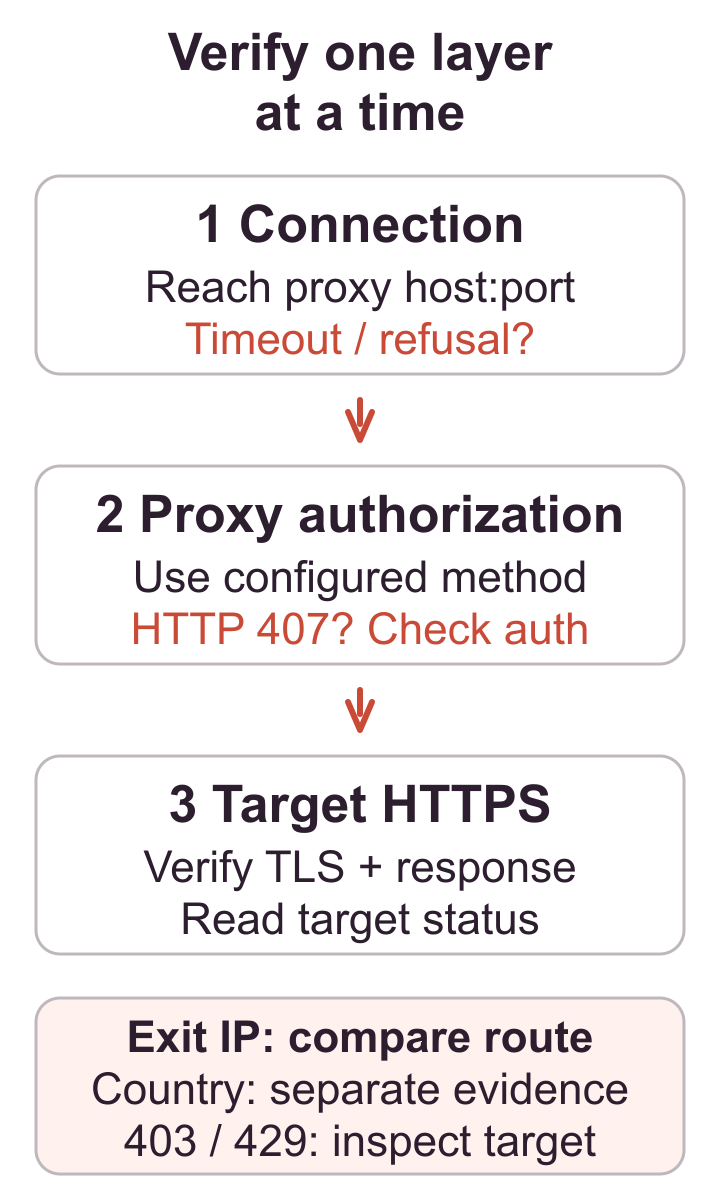
Enable the proxy only in the intended application or profile and repeat the IP check. Record the address and named location source. The result should match the assigned static exit or documented rotation behavior. A different gateway and exit can be normal; an unchanged direct address usually means a bypass, exclusion, stale connection, or wrong profile.
Do not publish full authenticated connection strings in screenshots or logs. Identify endpoints with a label and store secrets separately. One successful response proves only that request followed the route.
Protocol: test what the client actually supports
Verify HTTP, HTTPS-proxy, or SOCKS settings rather than swapping labels at random. A port can listen for one protocol and reject another. Curl’s official proxy option documentation is useful for an independent command-line check because it makes the proxy scheme explicit.
A 407 indicates missing or rejected proxy authentication. A connection refusal points to host, port, listener, or firewall. A timeout can involve routing, filtering, overload, or a distant destination. Record the exact stage and error rather than only working or broken.
TLS and DNS: preserve trust and inspect resolution
Request an HTTPS destination with normal certificate validation. Stop on an unknown issuer, hostname mismatch, expired certificate, or changed trust chain. Never disable verification merely to make the test pass. A conventional tunnel should preserve a valid destination TLS session.
DNS may be resolved by the client, the proxy, or both, depending on protocol and application. Compare results with the documented mode, then check browser-specific WebRTC behavior separately if exposure matters. DNS or WebRTC evidence does not turn the exit-IP result into a universal anonymity claim.
Stability: repeat a small sample
Run the same harmless request across several time windows and record success, median timing, slow outliers, exit changes, and error categories. Keep the schedule conservative. A single fast response says little about a route intended for repeated work, while aggressive testing can create the rate-limit problem it appears to measure.
Failure signal: intermittent authentication, unexplained exit changes outside the promised rule, repeated connect timeouts, or certificate variation indicates an unstable or misconfigured layer that needs investigation.
Destination check: separate route health from policy
Finally, perform one authorized action against the real website or API. Compare its response with the direct baseline and generic exit test. A destination 403, 429, challenge, or account security prompt can occur while the proxy is technically healthy. That response may require permission, slower volume, an official API, or stopping, rather than an IP replacement.
Evidence and safety limits: test only authorized targets, cap concurrency, respect rate limits, keep credentials and tokens out of captures, and retain enough timestamped evidence to reproduce the result without retaining sensitive response bodies.
If the HTTP exit is correct but browser or network signals still look inconsistent, run the proxy leak test to record DNS, WebRTC, and IPv6 separately against an explicit expected-result matrix.
Act on the evidence, then consider a location
If the route works but the observed country does not match the documented requirement, compare current proxy locations only after confirming that the client, database, and test method are consistent. For authentication-specific failures, continue with the authentication guide instead of buying another endpoint.
Does a 200 response prove that the request used the proxy?
No. A direct fallback, bypass rule or cached response can also return 200. Validate the response body and timestamp, compare the observed address with the expected route, and run the check from the application being evaluated. If routing is mandatory, define how the application should fail when the proxy is unavailable.
For the related implementation or diagnosis, check routing channels separately.
A private proxy trial: record a decision before buying more
Use the request checker for a quick observation of the request reaching Mexela. Use this guide when you need a repeatable, multi-layer acceptance test of an endpoint configured in your own client. The checker does not connect to a supplied remote proxy or certify its speed, country or anonymity.
- Write the required client, protocol, authentication method and permitted destination before testing a paid assignment.
- Keep a direct control and the intended proxy route separate. Record status, observed route and the client’s failure reason; retain failed attempts in the sample.
- After a replacement, repeat the same bounded check. Change one setting at a time so that a new result can be interpreted.
- Decide whether the required workflow passed. Record untested requirements separately before increasing the package size.
Use the fillable testing worksheet and CSV to preserve the evidence. If the gateway returns 407, collect the authentication support record rather than treating a replacement as proof of recovery.
Download and reuse the original diagram
The original technical diagram is available as SVG and PNG through the diagram downloads and reuse instructions. Credit Mexela and identify changes under CC BY 4.0. The grant covers this original figure, not the article, software, third-party documentation or logo.